
Arcade darts games for a real board
Real darts.
Arcade energy.
THROWCADE is a darts game app that brings colourful arcade games to your real dartboard. Throw real darts, enter your hits and let the app track the action. Discover games for friends, families and your next game night.
How it works
Pick a game. Grab your darts.
01
Choose
Pick a game, add your players and follow its on-screen objectives.
02
Throw
Play on a real dartboard and enter throws manually.
03
Celebrate
Follow turns, scores and results on screen, then get ready for a rematch.
Game discovery
Pick your kind of chaos
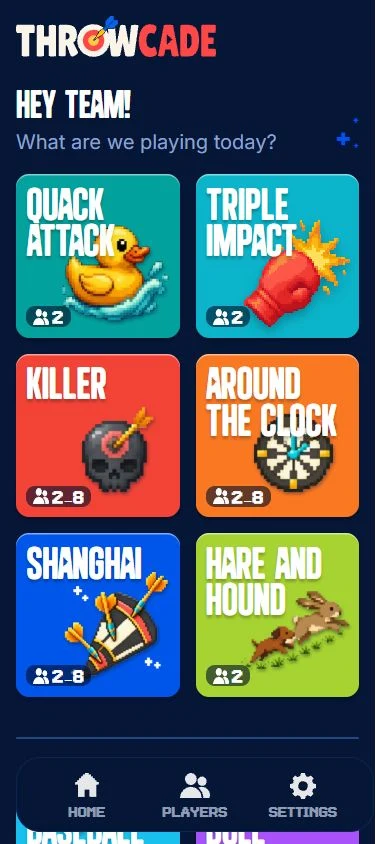
From Quack Attack to Triple Impact, each THROWCADE game gives your real darts a different purpose. Explore the themes and see which game suits your group.
Quack Attack
A two-player darts showdown: hide your flock and search for your rival’s ducks.

Triple Impact
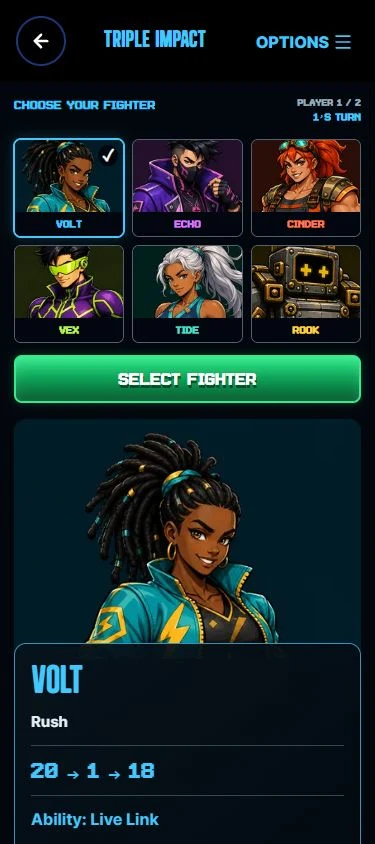
Choose a fighter and turn real darts into a head-to-head arcade battle.

Hot Potato
Pass the pressure to the next player in a lively darts survival game.

Around the Clock
Travel around the dartboard in a target race with THROWCADE’s arcade presentation.

Baseball
Bring runners home in a baseball-themed darts contest.

Shanghai
A changing-target darts contest where a special turn can change the game.

Bull Rush
Turn your darts into forward motion in a colourful race to the finish.

Hare and Hound
Be the runner or the pursuer in a two-player chase around the board.

Killer
Build your position and outlast your rivals in THROWCADE’s Killer darts game.

Treasure Hunt
Search a pirate map with real darts and see who uncovers the treasure.

Meteor Mayhem
Work together to defend the planet in a co-operative darts challenge.

ThrowQuiz
Know the answer? Use your darts in a quiz-show challenge hosted by Dartling.

X01 Games
Play classic countdown darts with clear scores, turn prompts and results.

Cricket
A classic target-closing darts game with THROWCADE keeping the match in view.

Turf War
A territory-themed darts game in development for the THROWCADE line-up.

Safe Cracker
A vault-opening darts puzzle in development, built around deduction and discovery.

Castle Siege
A fantasy-themed darts game being developed for THROWCADE.

Ghost Hunt
A haunted darts adventure in development for the THROWCADE line-up.

Last Dart Standing
A survival-themed darts contest in development, where staying in matters.

The Forge
THROWCADE’s darts RPG concept, currently in development.

The public demo offers a taste of THROWCADE. Full Play access is currently limited to approved accounts; available games and features depend on your access.
Inside the app
More play. Less admin.
Friends & invites
Keep a friends list and invite friends to an online room when you are ready to play.
Local & online
Share the action around one board or meet in an online room for a supported game.
XP & achievements
Earn character XP through eligible completed games, unlock accessories and explore your Trophy Cabinet.
Your notifications
Choose invitation and achievement notices, browser alerts, quiet hours and friend visibility in App Settings.
These connected player features are part of account-controlled Play. They are not included in the public demo; browser alerts also need device permission.
“The pub-game feeling, without leaving home.”Real darts · family play · fewer barriers
Make it your game night
The pub-game feeling, without leaving home
Create your own player character, save your regular group and come back for another round. Play brings friends, game invitations and character progression together, while the dartboard stays at the centre of the action.
Looking for something different from another leg of 501? Explore the THROWCADE games or find a simple format in our darts rules and game guides.
Get updates
Ready when we are?
Join the list for launch news, early previews and the occasional behind-the-scenes update.
Questions, answered
Before your first throw
What is THROWCADE?
THROWCADE is an arcade-style darts game app for a real dartboard. Throw physical darts, enter your hits and follow the game objectives, turns, scores and results on screen.
How is THROWCADE different from a darts scoring app?
THROWCADE centres on games with their own themes and objectives, alongside classic darts formats. It combines the physical throw with shared-screen action, player characters and progression.
Can I try THROWCADE without an account?
The public browser demo offers a taste of THROWCADE without an account. Full Play is currently in private testing and requires an approved account. Creating a website account or joining the update list does not automatically grant Play access.
Do I need a special dartboard?
Ordinary manual play uses a standard real dartboard, darts and a device running THROWCADE. Enter each dart using the on-screen controls; specialist camera-scoring hardware is not required. Keep the screen outside the throwing area.
Does THROWCADE score darts automatically?
Manual dart entry is the standard way to play. The app applies game rules and updates the game from the hits you enter. Experimental Auto Scoring is restricted to authorised test accounts and is not required for ordinary play.
Can I play with friends locally or online?
Play supports shared-screen local games and online rooms for permitted games. Keep a friends list, host a room and invite friends to join. Online play and social features require approved Play accounts and are not part of the public demo.
Does THROWCADE have achievements and player levels?
Yes. In Play, eligible completed games earn character XP. Player levels unlock character accessories, while achievements and their progress can be explored in the Trophy Cabinet. Progress belongs to the character you play with.
Can I control notifications and friend visibility?
Yes. In Play, open Settings and then Notifications to choose invitation and achievement notices, browser alerts, quiet hours and friend-status visibility. Browser alerts also require permission on your device.
How many people can play?
Player arrangements and limits depend on the game. Check its setup screen for the options available to your account, whether you are arranging a local session or an online room.
Is THROWCADE suitable for children and families?
THROWCADE is made with family play in mind, but darts can have sharp points. Children need responsible adult supervision and age-appropriate equipment. Keep everyone behind the throwing line and retrieve darts only when the throwing area is clear.
Can I download THROWCADE from an app store?
A general app-store release date has not been announced. Approved accounts can use Play in a browser; invited Android testers should follow the instructions supplied with their test build. The public demo is available in a browser.
Where do I manage my account and privacy choices?
Use My Account on throwcade.com for account details and the Privacy Hub. Notification preferences and friend visibility are managed separately in Play through Settings and Notifications. Support can help with access questions.
How can I get help or report a website problem?
Visit the THROWCADE support page or email support@throwcade.com. Do not include passwords, payment details or other sensitive information.